
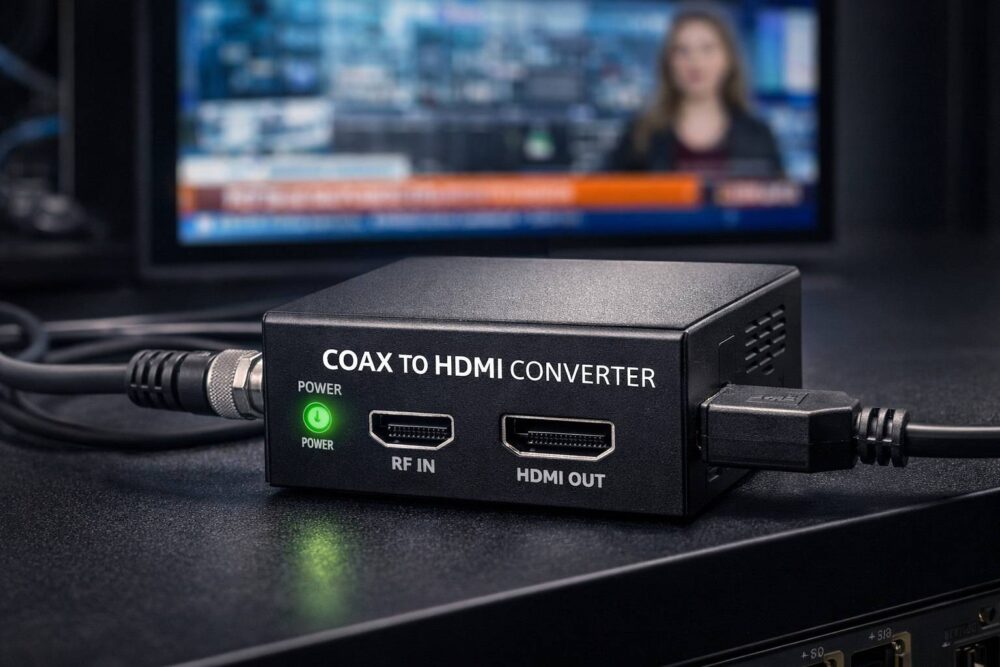
Coax to HDMI conversion is the process of taking a TV signal delivered over coaxial cable (RF)-the kind used for antenna TV, cable TV, or in-building RF distribution-and converting it into a digital HDMI output that a modern TV, monitor, capture device, or projector can use.
In practical terms, it’s how you turn something like:
– an antenna feed (ATSC in the U.S.),
– a cable TV feed (often QAM in private cable/hospitality systems),
– or an in-house RF modulated channel (from an HDMI RF modulator)
…into a clean HDMI signal you can plug into an HDMI-only display.
What Is Coax to HDMI Conversion?
Coax to HDMI conversion is the process of taking a TV signal delivered over coaxial cable (RF)-the kind used for antenna TV, cable TV, or in-building RF distribution-and converting it into a digital HDMI output that a modern TV, monitor, capture device, or projector can use.
In practical terms, it’s how you turn something like:
-
an antenna feed (ATSC in the U.S.),
-
a cable TV feed (often QAM in private cable/hospitality systems),
-
or an in-house RF modulated channel (from an HDMI RF modulator)
…into a clean HDMI signal you can plug into an HDMI-only display.
The Key Idea: RF Is a “Broadcast” Signal, HDMI Is a “Display” Signal
These two formats live in totally different worlds:
-
Coax/RF carries a radio-frequency signal that needs a tuner and demodulator to extract audio/video.
-
HDMI carries already-decoded digital video/audio meant to feed a screen directly.
So you can’t “wire-adapt” coax into HDMI with a passive adapter. You need an active device that can tune, demodulate, decode, and then output HDMI.
What Hardware Does Coax to HDMI?
Most of the time, you’re talking about one of these:
1) Digital TV Tuner / Set-Top Box (STB)
This is the most common method.
-
Coax in (antenna/cable/RF plant)
-
Tunes a channel (ATSC/QAM depending on the unit)
-
HDMI out to your display
Best for: everyday viewing, hospitality rooms, simple systems.
2) Professional IRD / Demodulator / Decoder
In broadcast and headend environments, you may use a rack-mount receiver/decoder.
-
Often supports more formats (and better control/monitoring)
-
May include ASI/IP outputs too, not just HDMI
Best for: headends, monitoring, enterprise distribution, reliability.
3) USB/PCIe TV Tuner + Computer (special cases)
A PC with a compatible tuner can receive RF and display or process the video, but output to HDMI is then done by the computer’s GPU.
Best for: analysis, capture, lab/testing-not typical for simple installs.
ATSC vs QAM vs “Analog”: You Must Match the Signal
Before buying anything, identify what’s actually on the coax:
-
ATSC (U.S. over-the-air antenna)
Common for rooftop/indoor antennas in North America. -
QAM (digital cable / private cable systems)
Very common in hotels, campuses, and in-building coax systems-especially where an HDMI RF modulator outputs QAM. -
Analog NTSC (legacy)
Rare today, but still seen in older systems.
A coax-to-HDMI device must support the modulation and encoding used on your coax line. A tuner that only supports ATSC won’t decode QAM channels, and vice versa.
Common Use Cases
Feeding Modern Displays in Legacy Coax Buildings
Many buildings still have coax in the walls but upgraded to flat panels that only have HDMI inputs (or unreliable RF tuners). A coax-to-HDMI converter (STB/receiver) bridges the gap.
Converting an In-House RF Channel Back to HDMI
In a venue or facility, you might modulate an HDMI source onto RF for distribution, then at specific points convert that RF channel back to HDMI for:
-
a video wall controller
-
a projector
-
a capture/streaming device
-
a monitor that lacks a compatible tuner
Bringing Antenna TV into Pro AV
You may want local OTA channels on an HDMI matrix, encoder, or production switcher. You tune the OTA feed (coax) and output HDMI into your AV workflow.
What to Watch Out For
1) Encryption and Provider Restrictions
If the coax feed is from a cable provider, channels may be encrypted. A generic QAM tuner won’t decode encrypted content without the provider’s authorized equipment.
2) HDCP and Downstream Devices
Once you’re in HDMI world, HDCP can become a factor-especially if you route HDMI into capture gear, encoders, or distribution amplifiers. (Many STBs enforce HDCP.)
3) Latency
RF-to-HDMI conversion involves decoding, so there is usually some latency. It may be fine for TV viewing, but could matter for live sports bar sync, IMAG, or interactive scenarios.
4) Audio Output Needs
Some installations need analog audio out (for house sound systems) in addition to HDMI. Make sure your converter/tuner provides the audio interfaces you need.
Coax to HDMI vs HDMI to Coax: Don’t Confuse the Direction
These get mixed up all the time:
-
Coax → HDMI = tuner/receiver/decoder (you are receiving RF and outputting HDMI)
-
HDMI → Coax = RF modulator (you are creating an RF channel from an HDMI source)
If your goal is to distribute one HDMI source to many TVs over coax, you need an HDMI RF modulator.
If your goal is to take an existing coax TV feed and view it on an HDMI display, you need a coax-to-HDMI tuner/receiver.
Bottom Line
Coax to HDMI conversion is not a simple cable swap-it requires a device that can tune and decode RF television signals, then output the result as HDMI. The right choice depends on what’s on your coax (ATSC, QAM, analog), whether channels are encrypted, and how you plan to use the HDMI output (direct viewing vs distribution/capture). For more information, please visit Thor Broadcast’s Complete Guide to Converters & Adapters.